Getting Started
This page gets you from "we have zSYNC" to a running Odoo with the Zebroo Sync app open in front of you, and explains the handful of concepts you need before building anything.
If you want the background first, read the zSYNC Overview. If you already have the app open, skip to Building Your First Pipeline.
What you need
- An Odoo instance you can install modules on, version 11.0 to 19.0. zSYNC has one branch per Odoo version; 19.0 is the current one.
- The zSYNC modules, which are not on the Odoo App Store. They come from Zebroo's private repository — get in touch if you do not have access yet.
- Odoo administrator rights, to install modules and see the app.
You do not need to be a developer. Pipelines are configured in the Odoo interface, and the code fields that do exist are optional.
Three ways to get an instance
| Your situation | What to do |
|---|---|
| Zebroo runs your Odoo | Nothing — zSYNC is installed for you. Skip to Open the app |
| You run your own Odoo | Add the zSYNC modules to your addons path, then install the app |
| You want a local instance to try things on | Follow Local Development Setup |
The local setup page is written for developers working on zSYNC itself, but it is also the fastest route to a throwaway instance: it uses zodoo and gimera to build a complete Odoo with zSYNC in it from one clone.
Install the app
zSYNC is not one module but a set of them. zbsync is the core and the only
required one; the rest add specific capabilities — FTP, SOAP, Excel, mapping
helpers — and you install only what a pipeline actually needs. The full list is
in zSYNCs Odoo Modules.
In Odoo, go to Apps, clear the preselected search filters — this is the
step everyone misses, because the default "Apps" filter hides zSYNC — and search
for zbsync:

Install Zebroo Sync. Odoo pulls in the dependencies it needs.
You can add the optional modules later, at any point. A worker type that needs a module you have not installed simply will not appear in the list when you go to add it.
Open the app
Zebroo Sync now appears in the app menu, top left:
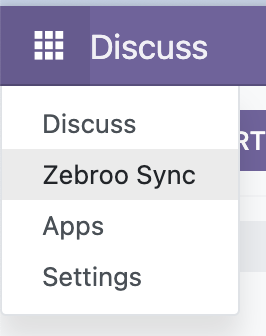
It opens on the Pipelines list, which is empty on a new instance.
If the app is not there after installing, it is almost always one of two things: the installation has not finished yet, or your user lacks the zSYNC access rights. An administrator can check the latter under Settings → Users & Companies.
The five ideas behind everything
Everything in zSYNC is built from these. Learning them now saves a lot of confusion later.
Pipeline — one integration, start to finish. "Import orders from the marketplace" is a pipeline. It is also the living documentation of that integration: what it does is visible on screen rather than buried in code.
Worker — one step inside a pipeline. Workers are chained together, each
handing its output to the next. Every pipeline automatically gets a start
worker (zbs.start) and an end worker (zbs.end); you add the useful ones in
between.
Grab → Map → Dump — the shape almost every pipeline takes. A grabber fetches data from somewhere, a mapper reshapes and renames the fields, a dumper writes the result to its destination. Once you see this pattern, most pipelines read the same way regardless of which systems they connect.
Zebroo Set — the data travelling between workers. Rather than each worker inventing its own format, they all pass Zebroo Sets, which is why a grabber written for FTP can feed a mapper that knows nothing about FTP. See Zebroo Sets.
Instance — the connection details for an external system: a URL, credentials, an environment. Instances are configured once and reused by every worker that talks to that system, so rotating a password is one edit rather than twenty.
Build something
With the app open, work through Building Your First Pipeline. It takes an empty pipeline to a working one that reads products out of Odoo, maps two fields and writes them to a file — roughly fifteen minutes, and it exercises the whole Grab → Map → Dump shape on data you already have, with no external system to configure.
After that:
| If you want to… | Read |
|---|---|
| Understand each kind of worker | Worker Types |
| Connect to a specific system | Grabber and Dumper Workers |
| Reshape data between systems | Mapper Workers |
| Run a pipeline automatically | Automation |
| Work out why a run failed | Debugging a Pipeline |
| See a complete real integration | Onshape to Odoo |
| Start from someone else's pipeline | Marketplace |
Common first-run problems
The Zebroo Sync app is missing from the menu. Either installation is still running, or your user does not have zSYNC access rights.
zbsync does not appear in Apps. The search filters are still applied —
clear them — or the modules are not in the instance's addons path. On a
self-hosted instance, update the apps list afterwards:
Apps → Update Apps List (requires developer mode).
A worker type you expected is not in the list. Its module is not installed. Check the name in zSYNCs Odoo Modules and install it from Apps.
A pipeline runs but produces nothing. Usually the grabber's filter matched no records. Open the run and inspect the data each worker passed on — Debugging a Pipeline shows how.